QA

Style Guide and Term rules help teams normalize and maintain data effectively

The QA section includes a configurable term dictionary and style guideline module. These views are customizable via the Fields view.

Terms

The Term Dictionary is typically used to document preferred and non-preferred terms, and to track additional metadata at the term level (definition, term type, open issues).
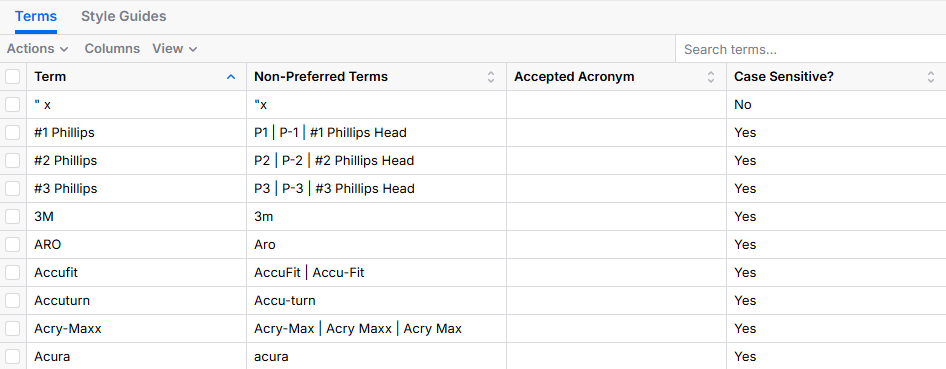
A screenshot of the Terms table showing a list of terminology entries with columns for Term, Non-Preferred Terms, Accepted Acronym, and Case Sensitive status. The table includes rows such as #1 Phillips, #2 Phillips, #3 Phillips, 3M, ARO, Accufit, Accuturn, and Acry-Max, with corresponding alternate spellings or synonyms listed in the Non-Preferred Terms column and most entries marked as case sensitive.

Style Guides

The Style Guidelines module is typically used to maintain rules related to formatting of categories, attributes, item names, etc. This view is also configurable using the Fields view.
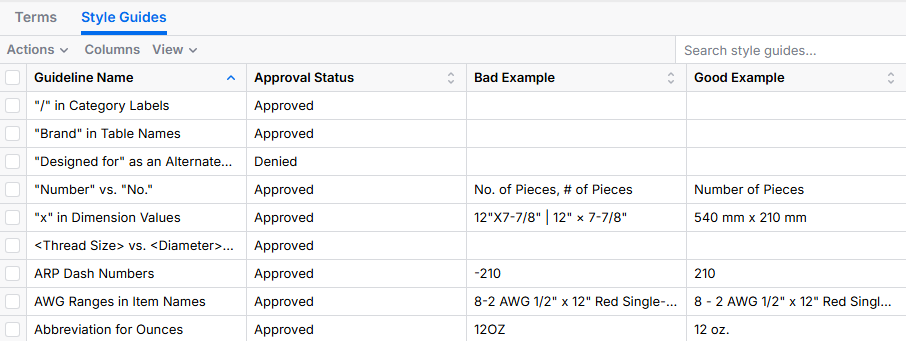
Screenshot of a Style Guides table in a web-based interface with a Terms tab visible beside it. The table shows columns for Guideline Name, Approval Status, Bad Example, and Good Example. Several rows list formatting rules such as / in Category Labels, Brand in Table Names, Number vs No., x in Dimension Values, Thread Size vs Diameter, ARP Dash Numbers, AWG Ranges in Item Names, and Abbreviation for Ounces. Most entries are marked Approved, with one marked Denied. Example columns show formatting corrections like No. of Pieces vs # of Pieces, dimension formatting like 12 x 7-7/8 corrected to 540 mm x 210 mm, dash normalization such as -210 to 210, and abbreviation normalization such as 120Z to 12 oz.