Dashboard
Contains basic statistics about a category or branch. Can be customized to include any project summary information.
Each category has the following standard view, which can be accessed by opening a category:
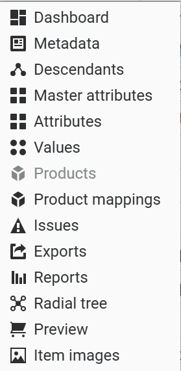
Contains basic statistics about a category or branch. Can be customized to include any project summary information.
Contains category field values, as defined in the Fields view.
A table-view summary of child categories.
A consolidated list of unique attributes in the project, including summary statistics.
A list of all attributes related to the category, including global attributes, inherited attributes, and category-specific attributes. Also includes any attribute fields set up via the Fields view.
An editable list of category-specific attribute values. Contains each unique value for each attribute.
The primary “grid view” of items and attributes. Includes a toggle between product-level and item-level entities.
A summary of item mappings across hierarchies. Product Mappings are only relevant when items are classified to mlutiple hierarchies.
The category-specific issue log
Displays all available standard and custom exports, grouped by type.
Summary reports pertaining to the hierarchy, items, and attributes.
A radial tree view of the hierarchy, with the selected category as the center point. If root is selected, allows for a radial view of the entire hierarchy.
An alternate view of items/products in the category that can be customized to reflect the expected display view.